Never miss a renewal
Keep agreements, renewal dates, notice deadlines, owners, and reminders in one place.
Renewlio gives your team one operating system for recurring agreements—from the first record and reminder to approval, completion, and the next planning cycle.
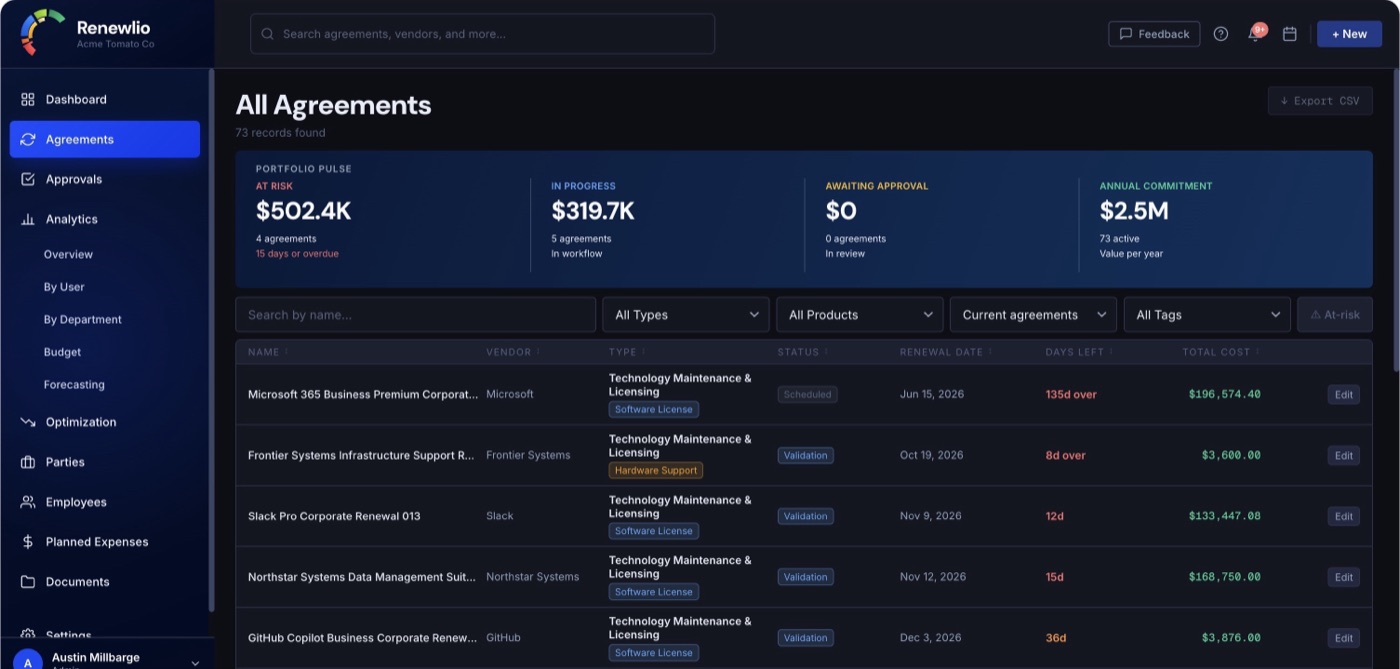
Organize the agreement, coordinate the people, understand the spend, and act while your team still has options.
Keep agreements, renewal dates, notice deadlines, owners, and reminders in one place.
Move work through a clear process with decisions and activity recorded along the way.
Understand spend, upcoming commitments, vendor concentration, and department costs.
Surface unused allocations, excess capacity, duplicate products, and open decisions.
Store agreements, quotes, orders, amendments, invoices, and supporting files together.
Assign owners, route approvals, request vendor input, and preserve decision history.
Explore the capabilities that support the full agreement and renewal lifecycle.
Build a searchable source of truth for every recurring agreement, vendor, product, and renewal cycle.
Track software, SaaS, maintenance, hardware support, cloud commitments, telecom services, and related recurring expenses.
Record quantities, unit prices, billing cycles, discounts, currencies, accounting codes, and prior-year pricing.
Support named-user, device, concurrent-user, processor/core, site, enterprise, usage-based, and custom models.
Preserve prior renewal cycles while keeping the current cycle easy to find and manage.
Maintain vendor profiles, owners, contacts, and the agreements connected to each party.
Find agreements by name, vendor, owner, status, type, urgency, tag, or product.
Bring agreement and vendor data in by CSV and export operational or accounting ready workbooks.
Make important dates visible early enough for your team to choose its next move.
View upcoming dates by month with urgency cues that make near-term work easy to spot.
Set organization-wide or agreement-specific reminder windows.
Calculate notice dates from renewal terms and alert teams before auto-renewal or evergreen deadlines.
Keep owners and administrators informed about renewals, workflow activity, and approaching milestones.
Complete one cycle and carry the agreement into the next without rebuilding it from scratch.
Give each renewal a repeatable path, clear ownership, and a complete decision trail.
Coordinate validation, usage review, quoting, authorization, purchase confirmation, and completion.
Route authorization according to annualized totals or individual line-item thresholds.
Let designated approvers review context and approve or decline through a single-use link.
Collect decisions or supporting information without requiring full workspace access.
Request quotes and documents through a secure, tokenized upload experience.
Retain workflow changes, approvers, notes, timestamps, and outcomes for future reference.
Turn agreement data into the portfolio, budget, and forecast views leaders need.
Monitor active agreements, upcoming renewals, pending approvals, annual spend, and spend at risk.
Explore spend by vendor, department, product type, status, renewal risk, and year.
Compare planned expenses with agreement-based cash flows and see when recurring charges land.
Model pricing or quantity changes before they become commitments.
Attribute product costs to the people and teams that use them.
Keep values in their original currency while consolidating portfolio reporting in USD.
Download analysis-ready workbooks for finance and operational reporting.
Connect ownership and usage to the decisions that reduce waste before the next commitment.
Connect products to employees, devices, groups, or departments and see who consumes each entitlement.
Compare purchased quantities with active usage before the next quote or renewal decision.
Identify unused allocations, excess capacity, duplicate products, and decisions needing attention.
Assign an owner and due date, document the action, and compare projected with realized savings.
Preserve point-in-time allocation and cost snapshots for trend and accountability reporting.
Keep supporting material organized and give each person access appropriate to their responsibilities.
Organize agreements, quotes, purchase orders, amendments, invoices, and supporting files.
Give administrators, agreement managers, and agreement owners appropriate access.
Add authenticator-app verification and enforce it at the organization level when required.
Configure branding, currency, timezone, reminders, approval workflows, and user access.
Keep each organization’s users and agreement data in a dedicated tenant workspace.
Allow administrators to extract organization data when needed.
Directory and sign-in integrations are available with the Elite plan for teams that need centralized identity and access.
Sync people, groups, devices, and license data from Microsoft Entra ID, Google Workspace, or Okta.
Let employees sign in through your organization’s identity provider.